APPOINTMENT PREP

Every appointment, walked in ready.

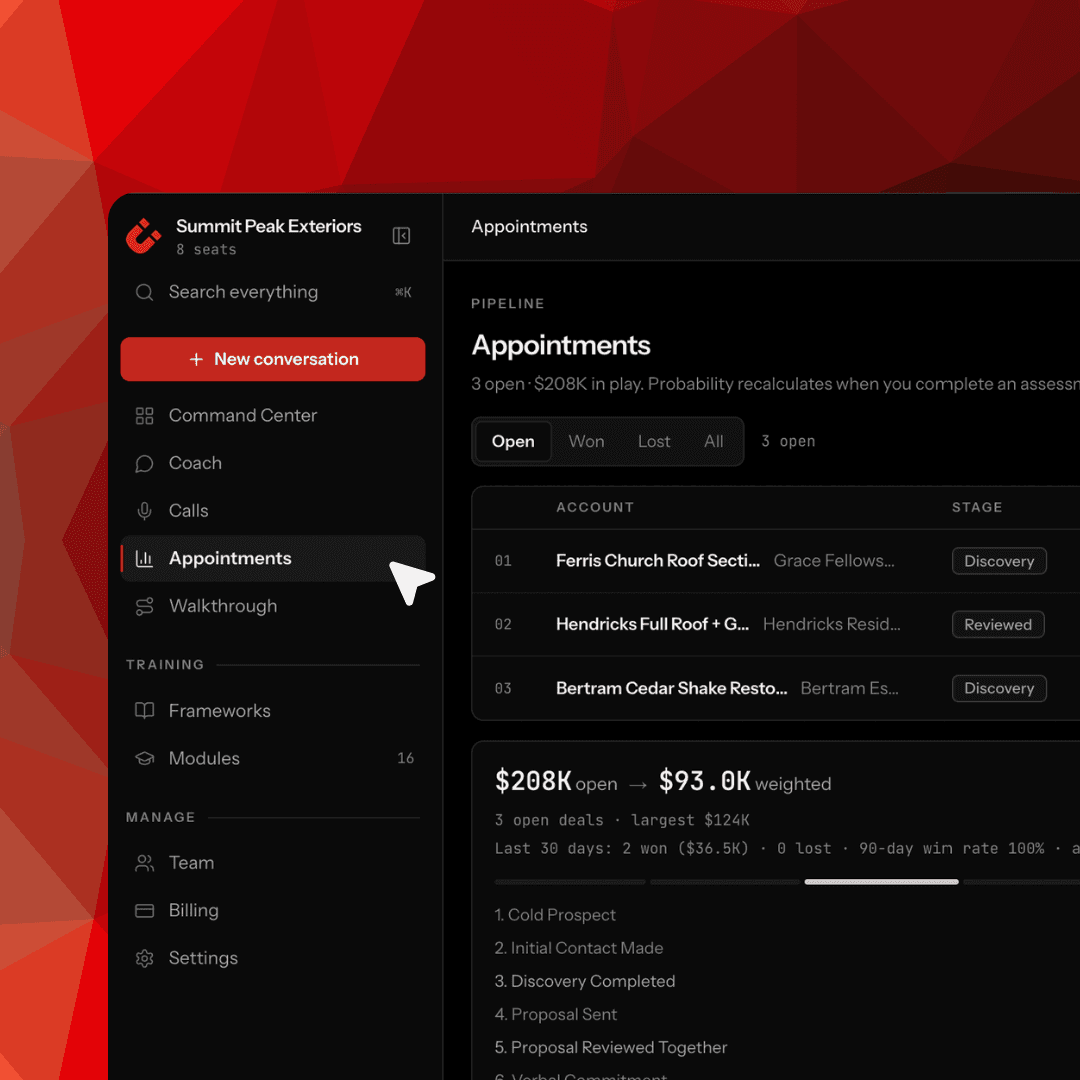
Before a rep heads into an appointment, Clozers helps them prep the objections likely to come up, the questions to ask, the plan to run. After, they log what happened, so the next call picks up where the last one left off. Nothing falls through, and every appointment sharpens the one after it.

Prep every appointment before it happens

Log outcomes so nothing slips between calls

Each call builds on the last, not from scratch
DEEP DIVE

Every appointment, before and after.

One place to prep before the call and log what happened after — so nothing slips and every appointment builds on the last.

Prep Before You Go

Pull up the appointment and get ready — the objections likely to come up, the questions to ask, and the plan to run, coached against a proven method.

AI automation dashboard showing modular components like LLM routing, email, web search, and document parsing in a clean UI.

Log What Happened

After the call, capture the outcome and key details while they're fresh — so nothing gets lost between a truck, a phone, and the next appointment.

AI automation dashboard showing real-time traffic metrics, performance trends, and system uptime in a clean UI.

Build Call to Call

Every appointment picks up where the last left off — reps walk in knowing exactly what happened before, instead of starting cold.

AI automation dashboard showing agent execution steps, response times, and workflow trace in a clean UI.

HOW IT WORKS

From "hope it goes well" to walking in with a plan.

01

Create the deal

Add the appointment with the details that matter — value, stage, close target — so every call has a plan behind it, not a sticky note.

AI automation dashboard showing agent performance metrics, workflows, and run analytics in a dark UI.
AI automation dashboard showing deployment controls, response time, success rate, and performance trends in a dark UI.

02

See the full picture

Deal probability, current stage, notes, and history in one place — the rep knows exactly where the deal stands before they walk in.

03

Assess before and after

Get coached before the meeting on how to run it, then log how it went after — so the next step is clear and nothing gets lost.

AI automation dashboard showing active agents, automation workflows, and status tracking in a dark UI.

BUILT TO ACTUALLY GET USED

Prep reps want to do, not another form to fill out.

CRM hygiene fails because logging feels like busywork with no payoff for the rep. Clozers flips that — prep gives reps a real edge walking into the call, and logging feeds their own coaching and their next appointment. The rep gets something back every time, so it actually gets used instead of skipped. Prep that helps you close is prep reps do on their own.

FAQ

Frequently asked questions

Everything you need to know to get started.

Does this connect to my CRM?

CRM sync is on the way. Today, reps prep and log appointments directly in Clozers, so nothing gets lost between calls — and as CRM integrations roll out, that data will flow into the tools you already use.

What does a rep actually do to prep?

They pull up the appointment and Clozers helps them get ready — the objections likely to come up, the questions to ask, and the plan to run, drawn from a proven method. It takes minutes, not a whole prep session.

What gets logged after an appointment?

The outcome and the key details — what happened, where the deal stands, what's next. It's built to be quick so reps actually do it, not skip it.

Will my reps actually use this, or ignore it like CRM logging?

This is built so the rep benefits directly — prep gives them an edge on the call, and logging feeds their own coaching and their next appointment. When the rep gets something back, it gets used.

How is this different from just putting notes in a CRM?

A CRM note sits there. In Clozers, what a rep logs feeds their coaching and their prep for next time — so the information does something, instead of just being stored.

Does the coach help with the actual appointment content?

Yes. Prep is coached against a proven method — so reps aren't just reminded to prepare, they're prepared well, with the objections and questions that fit the call they're about to run.

Does this work for in-person and phone appointments?

Yes. Whether it's a phone call or an in-person appointment, reps can prep before and log after — built for field and inside sales alike.

Can managers see appointment activity across the team?

Yes. Appointment activity and outcomes roll up into Command Center, so managers can see how appointments are going across every rep — not just one at a time.

FAQ

Frequently asked questions

Everything you need to know to get started.

Does this connect to my CRM?

CRM sync is on the way. Today, reps prep and log appointments directly in Clozers, so nothing gets lost between calls — and as CRM integrations roll out, that data will flow into the tools you already use.

What does a rep actually do to prep?

They pull up the appointment and Clozers helps them get ready — the objections likely to come up, the questions to ask, and the plan to run, drawn from a proven method. It takes minutes, not a whole prep session.

What gets logged after an appointment?

The outcome and the key details — what happened, where the deal stands, what's next. It's built to be quick so reps actually do it, not skip it.

Will my reps actually use this, or ignore it like CRM logging?

This is built so the rep benefits directly — prep gives them an edge on the call, and logging feeds their own coaching and their next appointment. When the rep gets something back, it gets used.

How is this different from just putting notes in a CRM?

A CRM note sits there. In Clozers, what a rep logs feeds their coaching and their prep for next time — so the information does something, instead of just being stored.

Does the coach help with the actual appointment content?

Yes. Prep is coached against a proven method — so reps aren't just reminded to prepare, they're prepared well, with the objections and questions that fit the call they're about to run.

Does this work for in-person and phone appointments?

Yes. Whether it's a phone call or an in-person appointment, reps can prep before and log after — built for field and inside sales alike.

Can managers see appointment activity across the team?

Yes. Appointment activity and outcomes roll up into Command Center, so managers can see how appointments are going across every rep — not just one at a time.

FAQ

Frequently asked questions

Everything you need to know to get started.

Does this connect to my CRM?

CRM sync is on the way. Today, reps prep and log appointments directly in Clozers, so nothing gets lost between calls — and as CRM integrations roll out, that data will flow into the tools you already use.

What does a rep actually do to prep?

They pull up the appointment and Clozers helps them get ready — the objections likely to come up, the questions to ask, and the plan to run, drawn from a proven method. It takes minutes, not a whole prep session.

What gets logged after an appointment?

The outcome and the key details — what happened, where the deal stands, what's next. It's built to be quick so reps actually do it, not skip it.

Will my reps actually use this, or ignore it like CRM logging?

This is built so the rep benefits directly — prep gives them an edge on the call, and logging feeds their own coaching and their next appointment. When the rep gets something back, it gets used.

How is this different from just putting notes in a CRM?

A CRM note sits there. In Clozers, what a rep logs feeds their coaching and their prep for next time — so the information does something, instead of just being stored.

Does the coach help with the actual appointment content?

Yes. Prep is coached against a proven method — so reps aren't just reminded to prepare, they're prepared well, with the objections and questions that fit the call they're about to run.

Does this work for in-person and phone appointments?

Yes. Whether it's a phone call or an in-person appointment, reps can prep before and log after — built for field and inside sales alike.

Can managers see appointment activity across the team?

Yes. Appointment activity and outcomes roll up into Command Center, so managers can see how appointments are going across every rep — not just one at a time.

Ready to get your whole team closing?

See Clozers in action, or start coaching your reps today.

Ready to get your whole team closing?

See Clozers in action, or start coaching your reps today.

Ready to get your whole team closing?

See Clozers in action, or start coaching your reps today.